プロフィール・アバター
3D 애니메이션 캐릭터 사진 변환
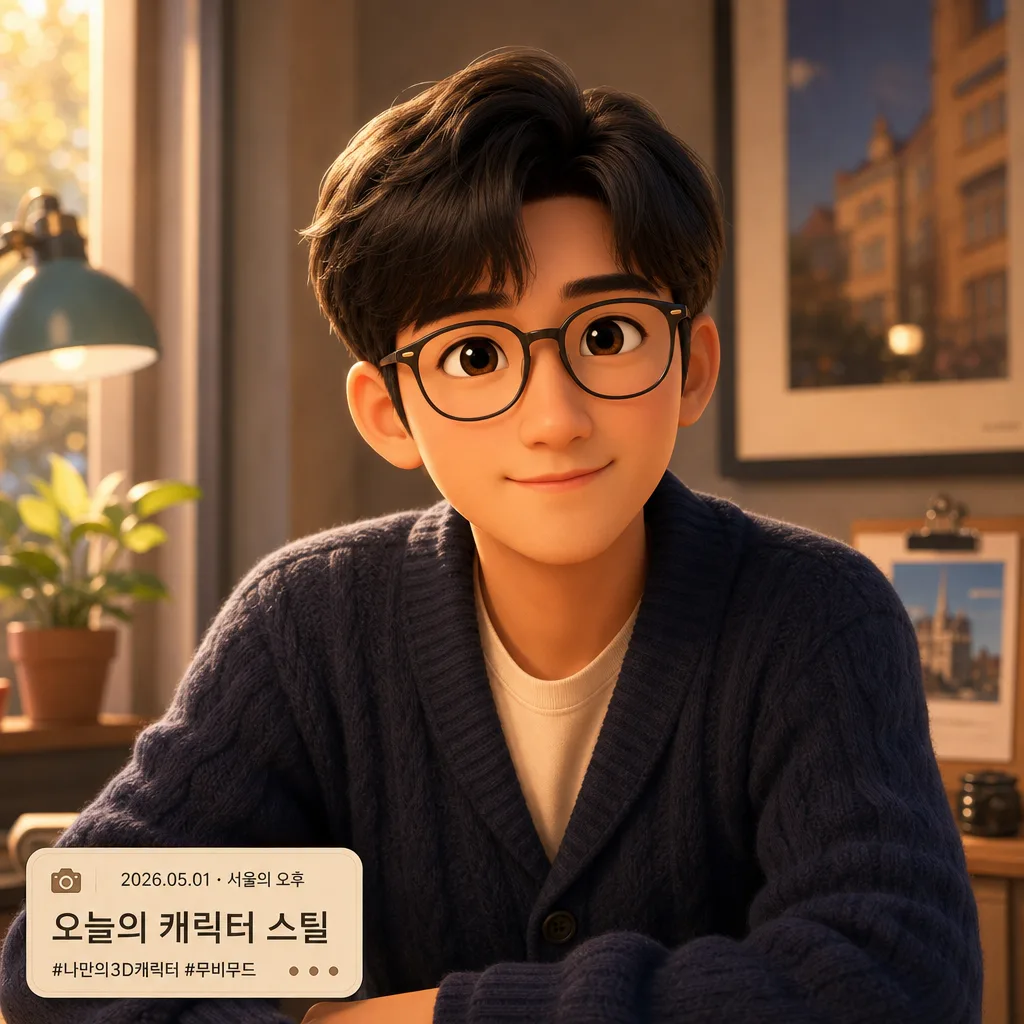
인물 사진을 Pixar 3D 캐릭터 풍으로 변환. 큰 눈, 부드러운 얼굴 라인.
3D 애니메이션 캐릭터 사진 변환の概要
プロフィール・アバター画像を作るためのChatGPT画像プロンプトです。主題、背景、スタイル、構図を整理し、すぐに試せるよう構成しています。
関連キーワード: 3D 애니메이션 캐릭터 사진 변환, 3D 애니메이션 캐릭터 사진 변환 프롬프트, プロフィール・アバター 프롬프트, プロフィール・アバター AI 이미지 프롬프트, ChatGPT 이미지 프롬프트, AI 이미지 생성 프롬프트, AI 프롬프트, 이미지 프롬프트
3D 애니메이션 캐릭터 사진 변환の活用方法
元の構造を保ちながら、被写体、背景、色、構図を変更して別案に展開できます。
- 主題を維持し、ブランドや季節、媒体に合わせて色と背景を変更してください。
- 結果が複雑な場合は背景要素を減らし、被写体、構図、照明を具体化してください。
- コピー後、ChatGPTに媒体、アスペクト比、文字の有無を追加で指定できます。
プロンプト原文
[Input]
- reference_image: {참고 이미지}
- language: Korean
- output_size: 1024x1024

[Purpose]
Transform the attached person photo into a polished 3D animated character portrait, keeping the subject recognizable while shifting the look into a family-friendly feature-animation aesthetic.
Designed for i2i character conversion use, with a square composition that feels like a Pixar / Disney-style movie still and a finished social-profile portrait.

[Composition]
- Center the subject as a half-body or chest-up hero portrait occupying about 65% of the frame, with the face clearly readable at first glance.
- Preserve {보존 항목} exactly enough that the person remains identifiable after stylization.
- Apply {변환 방향} as the primary style direction, while keeping proportions balanced, appealing, and expressive rather than exaggerated.
- Use {배경} as a softly stylized 3D environment that supports the character: include believable depth, gentle light falloff, and a few natural background details translated from the original photo.
- Add a small, elegant profile-card style label in the lower corner with {날짜 라벨}, {장소 라벨}, and a short caption {캡션 문구}; keep it secondary and integrated like a tasteful character poster tag.

[Core Structure]
1) Subject conversion layer: Rebuild the attached person as a 3D animated character with smooth geometry, gentle facial planes, and readable expression while preserving the original identity cues.
2) Facial feature treatment: Keep the eyes slightly larger in a natural animation proportion, with soft cheeks, clean nose bridge, and a friendly mouth shape; do not distort the face into caricature.
3) Hair / glasses / clothing retention: Match the original hairstyle, eyeglasses, expression, and outfit details from {보존 항목}, then translate them into a tidy 3D material style with believable fabric folds, seams, buttons, knit texture, hair volume, and subtle strand grouping where visible.
4) Rendering finish: Apply {변환 효과} with glossy but controlled shading, rounded highlights, and subtle subsurface scattering on skin for a polished animated-film look.
5) Background conversion: Reinterpret the original surroundings into {배경}, using depth separation, soft blur on distant elements, and simplified but recognizable props such as a warm window glow, desk item, plant, wall art, café light, street bokeh, or room detail when appropriate to the source image.
6) Profile detail layer: Add tiny decorative tags {장식 태그} near the lower label, plus a soft rounded rectangle backing plate, miniature dot separators, and a small camera/date icon motif rendered as simple shapes.
7) Image integrity: Keep the same person, same general pose, and same framing logic from the input photo unless a small composition cleanup is needed for better character readability.

[Style Rules]
- Typography: if text is added, use clean readable Korean sans-serif lettering; label text must remain small, sharp, and secondary to the character.
- Rendered text content: lower-corner label should read exactly “{날짜 라벨} · {장소 라벨}” and “{캡션 문구}”, with optional tag text “{장식 태그}”.
- Color palette: warm cinematic tones inspired by amber, peach, cream, soft teal, and muted blue-gray; if source colors conflict, preserve identity-critical colors first and stylize the rest.
- Materials: skin should feel soft and luminous, hair should have molded animated-film volume, clothing should show stylized fabric texture, and glasses or accessories should have believable transparent/reflection behavior.
- Border/shadow: soft ambient occlusion under the chin and around the shoulders, plus a gentle 8px y-offset drop shadow with 18% opacity to separate the figure from the background.

[Visual Style]
- Camera / lens: medium portrait framing, 85mm f/1.8 equivalent, shallow depth of field, subject-facing angle with minimal perspective distortion.
- Lighting: warm key light from upper-left at about 45°, subtle fill from front-right, and a soft rim light to carve the silhouette; keep skin highlights smooth and controlled.
- Color grade: Pixar-style warm highlights, creamy midtones, slightly cool shadows, and clean saturation without neon intensity.
- Surface detail: high-quality 3D render, soft subsurface skin, rounded specular highlights, clean contact shadows, fine fabric weave where clothing is close to camera, and cinematic bokeh in the background.

[Mood]
Premium animated character portrait — like a high-end Pixar feature still with a polished Disney character turnaround feel, enhanced with a warm personal profile-card detail that makes it feel ready for a social avatar or keepsake poster.

[Critical]
- Korean text accuracy: render the visible Korean label exactly as “{날짜 라벨} · {장소 라벨}”, “{캡션 문구}”, and “{장식 태그}” if included.
- Preserve the subject’s recognizable identity cues from the source photo, especially hairstyle, eyeglasses, facial expression, and clothing silhouette.
- Keep the output as a 3D animated character conversion, not a realistic photo retouch.
- Maintain anatomically correct facial proportions and natural pose structure.
- Make the environment feel lived-in and cinematic while keeping the person as the clear focal character.

[8. 🚫 PROHIBITED]
- Fake official seals / certifications
- Broken Korean characters
- Celebrity composites or impersonation of a real public figure
- Low-poly, flat 2D illustration, or photorealistic retouch that breaks the 3D animated character conversion