Infographics/Guides
교육 인포그래픽·강의 슬라이드 첫 화면
강의·교육 콘텐츠 슬라이드 첫 화면. 주제·강사·세션 번호 박힌 단정한 슬라이드 비주얼.
교육 인포그래픽·강의 슬라이드 첫 화면 summary
Copy this ChatGPT image prompt to create Infographics/Guides results. Its subject, background, style, and composition are organized for quick iteration.
Related keywords: 교육 인포그래픽·강의 슬라이드 첫 화면, 교육 인포그래픽·강의 슬라이드 첫 화면 프롬프트, Infographics/Guides 프롬프트, Infographics/Guides AI 이미지 프롬프트, ChatGPT 이미지 프롬프트, AI 이미지 생성 프롬프트, AI 프롬프트, 이미지 프롬프트
How to use 교육 인포그래픽·강의 슬라이드 첫 화면
Keep the prompt structure and swap the subject, background, palette, or composition to create new variations.
- Keep the main subject and adjust the palette and background for your brand, season, or channel.
- If the result feels busy, simplify the background and make the subject, composition, and lighting more specific.
- After copying, ask ChatGPT to adapt it for your platform, aspect ratio, or text requirements.
Original prompt
[Input]
- language: Korean
- output_size: 1536x1024

[Purpose]
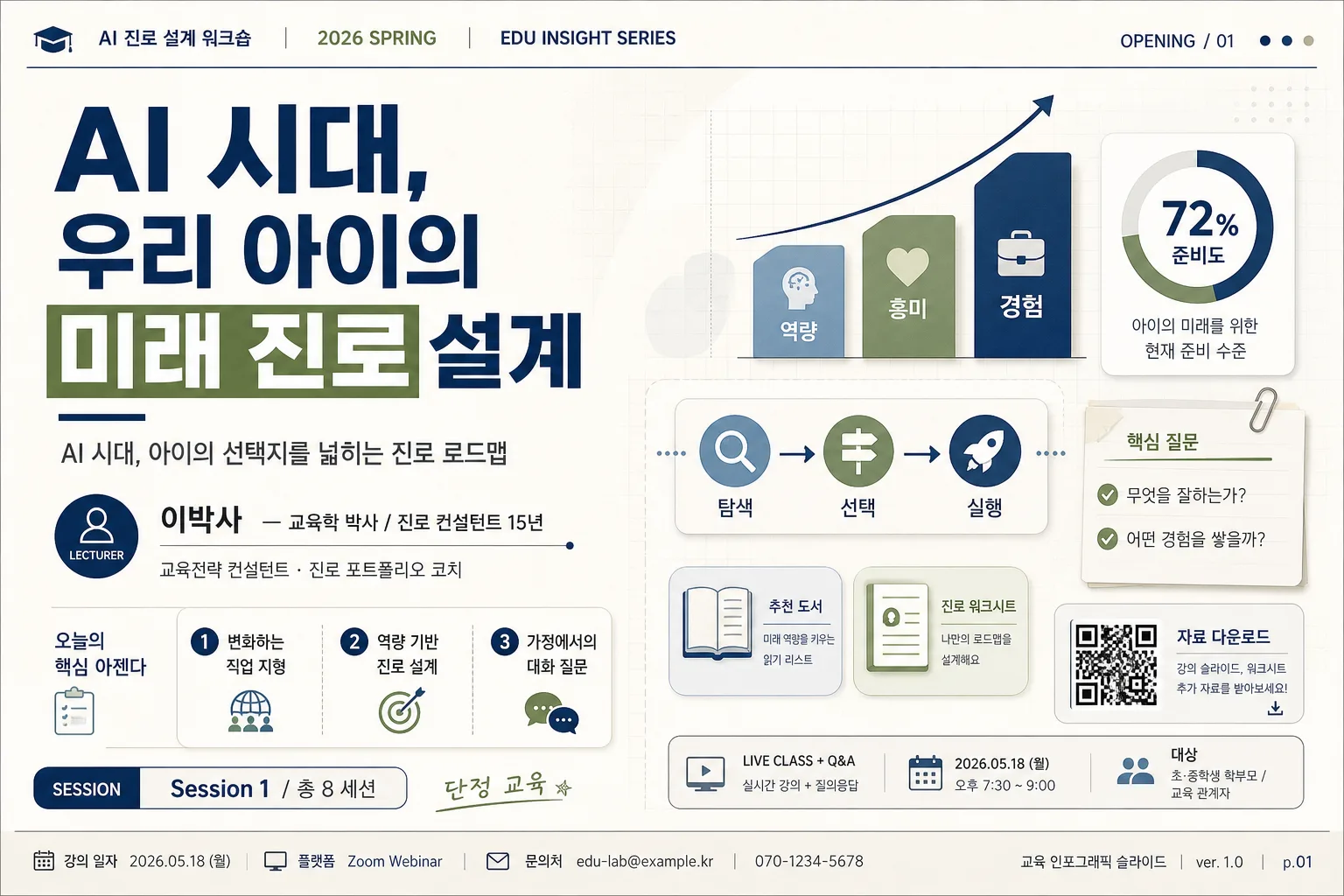
Korean educational lecture slide cover, 16:9 presentation opener for an AI-era career-planning talk.
Designed as a polished seminar title slide for parents and education professionals, suitable for classroom projectors, webinar thumbnails, printed handouts, and LMS course previews.
The slide should feel like a real first page from a premium Korean lecture deck, with practical session metadata, course navigation cues, and a compact infographic preview rather than an empty mockup.

[Composition]
- Left panel occupies about 58% of the frame: large title block, subtitle, speaker line, mini agenda, and session label stacked with clear hierarchy.
- Right panel occupies about 42% of the frame: a compact educational infographic cluster combining upward bars, connected learning-path nodes, small subject icons, and note-card shapes, secondary to the title but rich enough to look like a real lecture opener.
- Background surface: calm off-white or light beige with subtle paper grain, soft translucent geometric blocks, faint grid ticks, and light editorial texture.
- Add a slim top header line with realistic course metadata such as "AI 진로 설계 워크숍", "2026 SPRING", "EDU INSIGHT SERIES", and a small slide code like "OPENING / 01".
- Add small realistic lecture-deck details: date label "2026.05.18", format label "LIVE CLASS + Q&A", page indicator "01 / INTRO", a small QR-code style square, and a short access note "자료 다운로드".
- Use {강의 주제}, {강사}, {대상}, {세션 번호/총 세션}, {컨셉 톤}, {추가 정보}, {비율/사이즈} as the content variables.

[3. CORE STRUCTURE]
- Title area (upper-left, 30% height): set {강의 주제} in the largest type, bold and highly legible, aligned left with confident line spacing and subtle emphasis marks such as a navy underline accent or olive highlight block behind one keyword.
- Subtitle line (under title): add a smaller supporting line describing the lecture context for {대상}, using concise Korean copy in medium weight, for example "AI 시대, 아이의 선택지를 넓히는 진로 로드맵".
- Speaker block (mid-left): present {강사} as a neat credential line, separated by a thin divider rule or small dot motif; add a small label such as "LECTURER" and a realistic role line like "교육전략 컨설턴트 · 진로 포트폴리오 코치".
- Mini agenda block (lower-mid left): include 3 short Korean agenda bullets in small cards: "1. 변화하는 직업 지형", "2. 역량 기반 진로 설계", "3. 가정에서의 대화 질문".
- Session label (lower-left): place {세션 번호/총 세션} inside a compact pill, tag, or boxed label with strong contrast; pair it with "SESSION" or "강의 순서".
- Right visual area (center-right): place a compact educational infographic dashboard: upward bars labeled "역량", "흥미", "경험", connected node path labeled "탐색 → 선택 → 실행", two small book/document icons, one checklist card, and a circular progress ring showing "72% 준비도".
- Add a small callout card near the right infographic with Korean microcopy: "핵심 질문", "무엇을 잘하는가?", "어떤 경험을 쌓을까?".
- Footer strip (bottom edge): place {추가 정보} in very small text, aligned to the lower-left or lower-right; include additional realistic footer metadata such as "교육 인포그래픽 슬라이드", "ver. 1.0", "문의: edu-lab@example.kr", and a page indicator "p.01".
- Overall spacing should feel like a professional slide deck with a clear alignment grid, readable projector-friendly hierarchy, and meaningful lecture-material details.

[4. STYLE RULES]
- Typography: Pretendard or Noto Sans KR for the main title, Bold 42–56px; Medium 20–28px for supporting text; SemiBold 18–22px for labels; small metadata text 11–14px with excellent legibility.
- Color palette: navy #1F3A5F, olive #6B7D4C, beige #F3EBDD, warm gray #8A8F98, white #FFFFFF; use muted blue-gray and pale sage tints for small infographic cards.
- Border/shadow: use subtle 1px divider lines in muted gray and soft drop shadows on the right-side graphic cards, 4px y-offset, 12px blur, 12% opacity.
- Use {컨셉 톤} to influence accent intensity, icon softness, and wording style while keeping the deck professional and education-focused.
- Include tasteful editorial elements: micro labels, section tabs, tiny arrows, bracket marks, dotted connector lines, small chart legends, and light card layering.

[5. VISUAL STYLE]
- Camera / lens: flat graphic presentation layout, top-down design composition, no photographic perspective, clean vector-like rendering.
- Lighting: even studio-style illumination with no harsh shadows, as if designed under a softbox-lit editorial template.
- Color grade: muted navy + sage + sand with high readability and low saturation.
- Rendering quality: crisp Korean typography, precise vector edges, realistic lecture-deck spacing, subtle paper grain, refined UI-card shadows, and balanced infographic density.

[6. MOOD]
Professional Korean education seminar opener — similar to a refined Inflearn/Taling instructor slide, a university lecture presentation deck, and a premium education consulting webinar cover.
Trustworthy, practical, calm, and content-rich, with the impression that the slide belongs to a complete lecture series rather than a placeholder template.

[7. CRITICAL]
- Korean text accuracy: "{강의 주제}", "{강사}", "{대상}", "{세션 번호/총 세션}", "{추가 정보}" must appear correctly if rendered as visible text.
- Render added Korean text cleanly and legibly, including examples such as "AI 진로 설계 워크숍", "2026.05.18", "자료 다운로드", "핵심 질문", "탐색 → 선택 → 실행", "강의 순서", and "교육 인포그래픽 슬라이드".
- Layout invariants: left-side text hierarchy must remain dominant; right-side illustration/data graphic must stay secondary and compact; all main text must be crisp, clean, and fully legible.
- Respect {비율/사이즈} while maintaining the 1536x1024 presentation-cover implication.

[8. 🚫 PROHIBITED]
- Fake official seals / certifications
- Broken Korean characters
- Celebrity composites / unauthorized likeness