Social/Card News
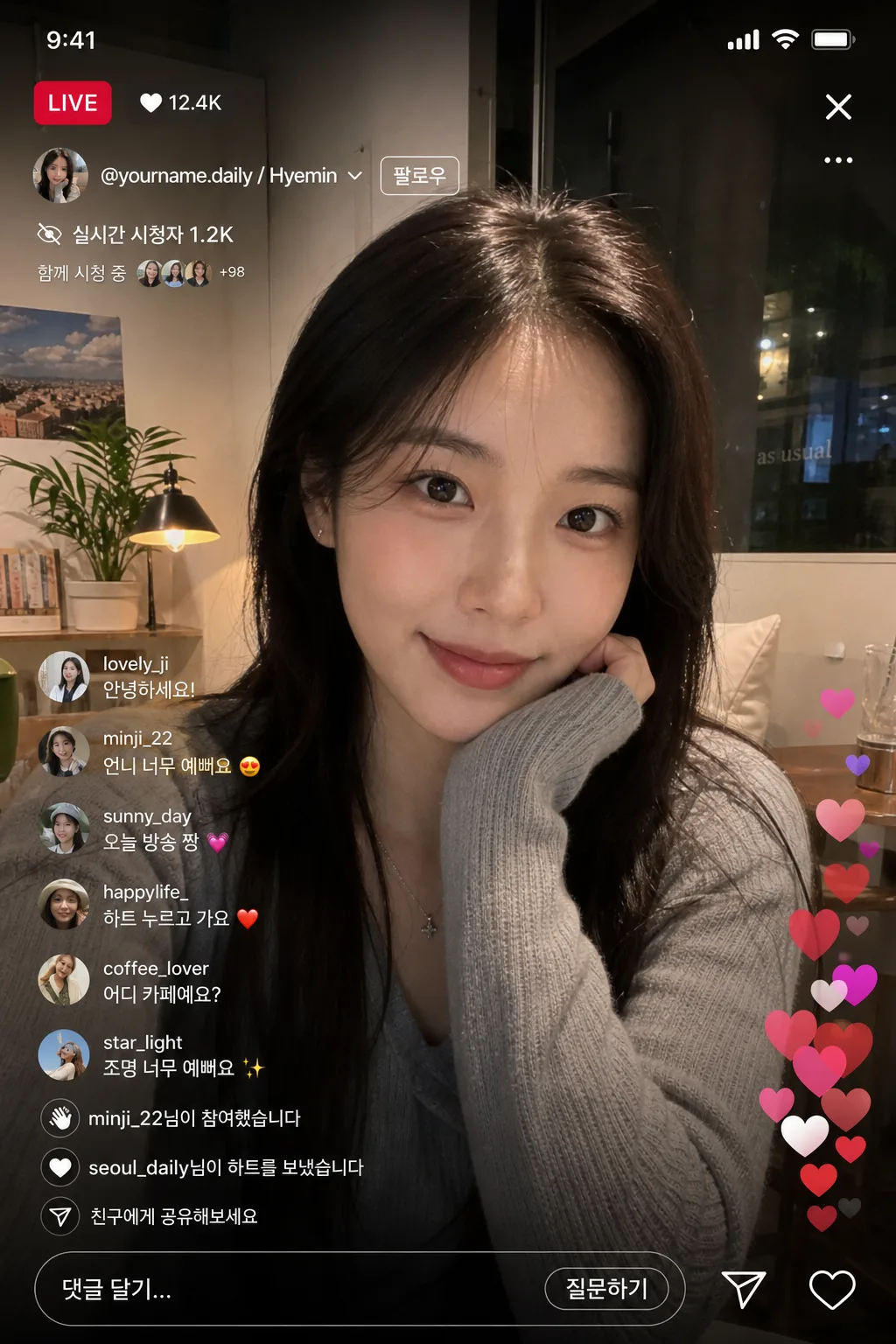
인스타그램 라이브 화면 목업
인스타 라이브 방송 화면 mockup. 본인 사진 + 라이브 UI (LIVE 빨간 라벨·시청자 수·하트·댓글·실시간 반응).
인스타그램 라이브 화면 목업 summary
Copy this ChatGPT image prompt to create Social/Card News results. Its subject, background, style, and composition are organized for quick iteration.
Related keywords: 인스타그램 라이브 화면 목업, 인스타그램 라이브 화면 목업 프롬프트, Social/Card News 프롬프트, Social/Card News AI 이미지 프롬프트, ChatGPT 이미지 프롬프트, AI 이미지 생성 프롬프트, AI 프롬프트, 이미지 프롬프트
How to use 인스타그램 라이브 화면 목업
Keep the prompt structure and swap the subject, background, palette, or composition to create new variations.
- Keep the main subject and adjust the palette and background for your brand, season, or channel.
- If the result feels busy, simplify the background and make the subject, composition, and lighting more specific.
- After copying, ask ChatGPT to adapt it for your platform, aspect ratio, or text requirements.
Original prompt
[Input]
- reference_image: {참고 이미지}
- language: Korean
- output_size: 1024x1536

[Purpose]
1-2 English lines: Instagram Live screen mockup using the provided portrait as the live host, designed to look like an authentic mobile screenshot captured during an active livestream.
Concrete: vertical 9:16 live interface recreation with real Instagram-style UI, profile identity, viewer count, live badge, scrolling comments, reaction hearts, share icons, bottom reply field, small interaction stickers, and a believable selfie environment.

[Composition]
- Subject placement: {원본 보존} portrait fills the center 62% of the frame, with the face and upper torso visible behind the live UI overlay; keep the subject looking directly at camera with a slight smile and natural live-video posture.
- Background treatment: {장면} with a realistic indoor setting such as a bedroom desk, cafe corner, studio nook, or evening room; include believable details like a lamp glow, plant silhouette, shelf, mug, cushion, window reflection, or soft wall decor while keeping the host readable.
- Spacing and framing: preserve a true smartphone screenshot framing with no tilted perspective; UI should wrap naturally around the portrait, with top status/header content, side reaction controls, and bottom chat/reply elements layered like a native live broadcast.
- Add small screen-realism details: faint compression texture, subtle front-camera grain, tiny status-bar indicators, touch-safe icon spacing, translucent chat bubbles, floating heart reactions, and a few viewer join notifications.
- Use {아이디·이름}, {시청자 수}, {라이브 라벨}, {실시간 댓글}, {장면}, {화면 톤}, {비율} as customizable placeholders.

[Core Structure]
- Top status bar: include a realistic phone status row with time, cellular/Wi‑Fi indicators, and battery icon in tiny white UI text, integrated into the live screenshot.
- Top-left header area: render {라이브 라벨} as a realistic Instagram Live badge cluster, aligned close to the screen edge with small padding and crisp UI proportions; include the visible label LIVE in a vivid red rounded pill.
- Upper identity line: place {아이디·이름} beneath or beside the live badge in compact white UI text, with a tiny circular profile thumbnail, subtle dot separator, and a follow-style micro label such as 팔로우.
- Main video area: {원본 보존} portrait stays centered in the live feed, with natural skin tones, believable front-camera perspective, intact hair/shoulders/hands, and clean blending against translucent UI overlays.
- Viewer indicator zone: place {시청자 수} near the upper area with subtle white text and tiny eye/person icon treatment, sized smaller than the name line; add a small line like 함께 시청 중 or 방금 입장 to increase livestream realism.
- Top-right control area: include a close X at top-right, plus small three-dot/options or share-style icon spacing that feels native to the app.
- Comment feed zone: stack {실시간 댓글} from lower-left toward mid-lower screen, each comment separated like a live chat overlay and gently rising upward in chronological order; mix in 4–6 short Korean comments such as 안녕하세요!, 언니 너무 예뻐요, 오늘 방송 짱, 하트 누르고 가요, 어디 카페예요?, 조명 너무 예뻐요.
- Viewer activity layer: add small translucent notifications such as minji_22님이 참여했습니다, seoul_daily님이 하트를 보냈습니다, and 친구에게 공유해보세요, positioned above the reply bar without blocking the face.
- Bottom interaction bar: include a rounded comment input field reading 댓글 달기..., a question/request button such as 질문하기, paper-plane share icon, heart icon, and small circular reaction buttons.
- Floating reactions: place several pink/red/purple heart bubbles rising along the right edge, varied in opacity and size, with a few overlapping softly like a real livestream reaction stream.
- Background scene zone: {장면} should read as a real-time selfie environment with casual domestic, studio, or cafe context and small lived-in details that make the broadcast feel current and spontaneous.
- UI authenticity layer: {화면 톤} must be applied consistently across all icons, gradients, live badge, translucent overlays, and text so the result feels like a genuine app capture, not an edited poster.
- Format layer: {비율} must be preserved exactly as a tall phone screenshot with full-screen mobile UI coverage.

[Style Rules]
- Typography: use a clean mobile UI sans style similar to SF Pro / Helvetica Neue / Noto Sans KR, regular to medium weight, with small 11–18px sized interface text, compact tracking, and crisp anti-aliased Korean glyphs.
- Color palette: true Instagram-like black overlay gradient, pure white text #FFFFFF, vivid red live badge #FF3040, soft gray UI accents #C8C8CC, translucent charcoal chat bubbles, and subtle signature gradient hues inspired by the app’s pink-orange-purple spectrum.
- UI depth: use native-feeling 1–2px edge contrast, translucent dark gradient wash near the top and bottom for legibility, soft glassy comment bubble opacity, and natural screen glow rather than poster-like drop shadows.
- Details: include micro icons, reaction hearts, tiny profile circles, notification pills, status-bar marks, and slight live-stream compression artifacts to make the image feel captured from an active phone screen.

[Visual Style]
- Camera / lens: smartphone front-camera look, equivalent to a 26–28mm full-frame wide selfie perspective at f/2.0–f/2.8, front-facing capture, slight facial perspective flattening typical of live video.
- Lighting: indoor ambient light with soft window light from upper-left at 45°, gentle fill from the screen glow on the face, no harsh flash and no dramatic studio setup.
- Color grade: natural skin tones with slightly cool-neutral live-stream processing, black UI overlay, white text, red live badge, soft pink/purple heart accents, and restrained saturation to mimic a real Instagram live screenshot.

[Mood]
Real-time social media capture — authentic Instagram mobile UI screenshot with a casual creator livestream feel, warm audience interaction, visible comments and reactions, and the spontaneity of a lifestyle influencer live session.

[Critical]
- Korean text accuracy: must appear exactly as written: "LIVE", "안녕하세요!", "언니 너무 예뻐요", "오늘 방송 짱", "하트 누르고 가요".
- Additional Korean UI text should be short and native-looking, such as "댓글 달기...", "질문하기", "님이 참여했습니다", "공유", "함께 시청 중", "어디 카페예요?", "조명 너무 예뻐요".
- Layout invariants: portrait subject remains fully identifiable behind the interface; comments must scroll upward from the bottom; live badge must sit top-left; the close X must appear top-right; heart count and floating heart reactions must be visible and feel native to a real livestream UI.
- Screen realism: the result must read as a genuine Instagram live screenshot, not an illustration or editorial poster; keep the vertical 1024x1536 phone-screen composition and the {비율} framing.

[8. 🚫 PROHIBITED]
- Fake official seals / certifications
- Broken Korean characters
- Celebrity composites or unauthorized likeness changes