SNS・カードニュース
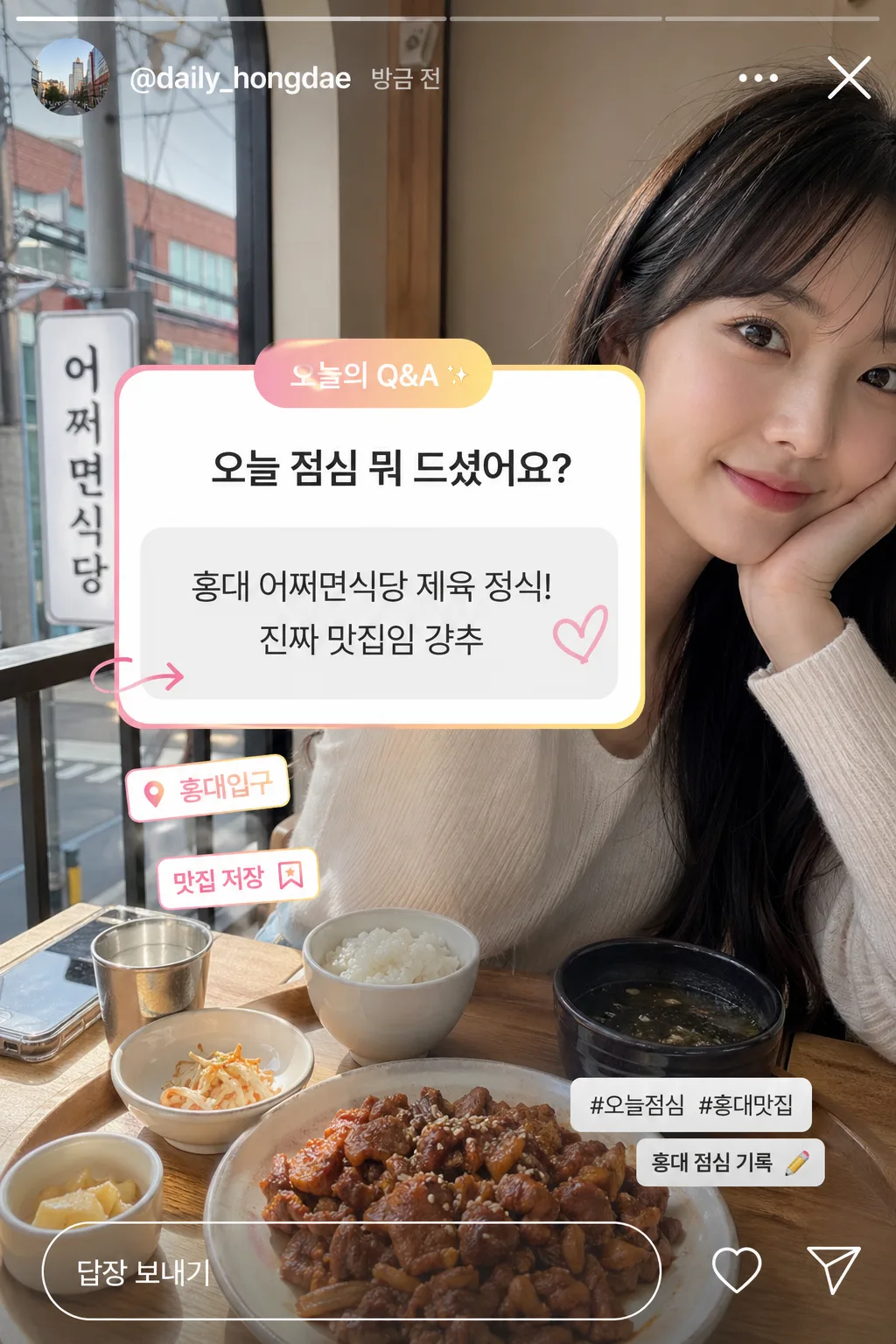
인스타 Q&A 박스 목업 (물어보세요·답변 가짜 스크린샷)
인스타 스토리 Q&A 박스 mockup. 사용자가 질문하고 본인이 답변하는 가짜 스크린샷. 인스타 짤로 활용.
인스타 Q&A 박스 목업 (물어보세요·답변 가짜 스크린샷)の概要
SNS・カードニュース画像を作るためのChatGPT画像プロンプトです。主題、背景、スタイル、構図を整理し、すぐに試せるよう構成しています。
関連キーワード: 인스타 Q&A 박스 목업 (물어보세요·답변 가짜 스크린샷), 인스타 Q&A 박스 목업 (물어보세요·답변 가짜 스크린샷) 프롬프트, SNS・カードニュース 프롬프트, SNS・カードニュース AI 이미지 프롬프트, ChatGPT 이미지 프롬프트, AI 이미지 생성 프롬프트, AI 프롬프트, 이미지 프롬프트
인스타 Q&A 박스 목업 (물어보세요·답변 가짜 스크린샷)の活用方法
元の構造を保ちながら、被写体、背景、色、構図を変更して別案に展開できます。
- 主題を維持し、ブランドや季節、媒体に合わせて色と背景を変更してください。
- 結果が複雑な場合は背景要素を減らし、被写体、構図、照明を具体化してください。
- コピー後、ChatGPTに媒体、アスペクト比、文字の有無を追加で指定できます。
プロンプト原文
[Input]
- language: Korean
- output_size: 1024x1536

[Purpose]
Instagram Story Q&A box mockup that looks like a realistic fake screenshot, designed for social media storytelling and casual Q&A content.
Vertical story-style phone screenshot composition using {비율}, with {배경 사진} as the full-screen background and an overlaid Instagram-style question-and-answer card enriched with believable story UI details.

[Composition]
- The background photo fills the full frame edge-to-edge, behaving like a captured Instagram Story rather than a studio mockup.
- Place the Q&A card in the upper-middle to center area, occupying about 34–42% of the frame width and 24–32% of the height, with believable mobile UI spacing.
- Use {배경 사진} as the full-screen backdrop; let natural details from the photo remain visible so the screenshot feels lived-in and personal.
- Render {Q&A 박스 질문} as the main focal text inside the question sticker, and {답변} as a casual reply-style block beneath it with clear hierarchy.
- Add authentic Instagram Story screenshot cues: top progress bar, small profile handle area, timestamp, close/menu icon hints, bottom reply field, tiny heart/share icons, and a subtle “답장 보내기” input bar.
- Include small social-card details such as “@daily_hongdae”, “오늘의 Q&A”, “홍대 점심 기록”, and short hashtag-like micro text such as “#오늘점심 #홍대맛집” without competing with the main Q&A.

[3. CORE STRUCTURE]
1. Background layer: {배경 사진} should fill the entire canvas like a real smartphone story screenshot, with natural crop, real texture, and contextual visual detail from the photo.
2. Story chrome layer: Add a thin Instagram-like progress bar at the very top, a tiny circular profile thumbnail placeholder, handle text “@daily_hongdae”, a small timestamp “방금 전”, and subtle top-right story icons consistent with {UI}.
3. Q&A UI layer: Add a white rounded question box with Instagram-like story styling, using a pink-to-light-yellow gradient accent around the UI, matching native story interface proportions.
4. Sticker header: At the top of the Q&A card, include a small gradient pill label reading “무엇이든 물어보세요” or “오늘의 Q&A”, with a tiny sparkle or question-mark icon accent.
5. Question area: Place {Q&A 박스 질문} near the top of the card in crisp Korean text, centered or slightly left-aligned depending on the UI layout, with strong readability and mobile-app scale.
6. Answer area: Place {답변} beneath the question region as a reply-style text block, visually separated with a soft divider, pale chat bubble, or light gray answer panel while staying integrated into the same story screenshot aesthetic.
7. Interface detail: Include a subtle “답장 보내기” button/input field at the bottom, a tiny paper-plane/share icon, a heart icon, and a small “친한 친구” or “공유” micro label if it fits the UI naturally.
8. Decorative story details: Add 1–2 small sticker-like accents such as a tiny “맛집 저장” tag, location pin label “홍대입구”, or a small doodle arrow pointing toward the answer, using the same blush pink, pale yellow, and soft coral palette.
9. Photo-treatment: Preserve the natural look of the background photo while applying a very slight translucent dark or light gradient behind the UI only where needed for text readability; keep the Q&A card sharply legible.
10. Screenshot realism: The final image should read like a genuine Instagram Story capture, with believable spacing, rounded corners, native app proportions, subtle compression feel, and layered mobile interface details.

[4. STYLE RULES]
- Typography: use Pretendard or Noto Sans KR for Korean UI text, medium to semibold weight for the question, regular to medium weight for the answer, with sizes that match mobile story readability.
- Color palette: white #FFFFFF for the card, blush pink #F8B8C8, pale yellow #FFF3B0, soft coral #FF8FA3, light gray #E9E9E9, and the natural tones from {컬러 톤}.
- Border/shadow: use a soft drop shadow with 4px y-offset, 14px blur, 16% opacity, and rounded corners around 22px to mimic a mobile overlay.
- UI styling: keep the Q&A element compact, native-looking, and touch-friendly, with a subtle gradient ring or highlight typical of story UI.
- Microcopy styling: set secondary details like “@daily_hongdae”, “방금 전”, “답장 보내기”, “홍대입구”, and hashtags in smaller Korean UI text with realistic opacity and spacing.
- Visual hierarchy: the largest readable text is {Q&A 박스 질문}, the second strongest text is {답변}, and all handle, timestamp, hashtag, sticker, and icon details remain secondary.

[5. VISUAL STYLE]
- Camera / lens: smartphone front-camera story capture look, equivalent to a 26–28mm full-frame smartphone wide lens, vertical crop, slight perspective distortion typical of handheld story screenshots.
- Lighting: preserve the lighting already present in {배경 사진}; if the scene looks indoor, keep soft ambient light from the side, and if outdoor, retain natural daylight without artificial studio treatment.
- Color grade: natural story-screenshot grade with the background photo kept mostly intact, while the Q&A card uses pink and light pastel accents for contrast.
- Texture realism: allow subtle phone screenshot artifacts, slight app-layer translucency, natural background grain, and realistic compression softness while keeping all Korean text crisp.

[6. MOOD]
Casual Instagram Story screenshot — like a real everyday Q&A post captured from a personal social feed, with the authenticity of a mobile app interface, friendly lunch-chat energy, and spontaneous social storytelling.

[7. CRITICAL]
- Korean text accuracy: 반드시 아래 문구가 정확히 보여야 함
  - {Q&A 박스 질문}  예시 기본값: "오늘 점심 뭐 드셨어요?"
  - {답변}  예시 기본값: "홍대 어쩌면식당 제육 정식! 진짜 맛집임 강추"
- Additional small Korean UI text may appear naturally, such as "무엇이든 물어보세요", "오늘의 Q&A", "답장 보내기", "방금 전", "홍대입구", "홍대 점심 기록", "#오늘점심 #홍대맛집".
- The UI must feel like a real Instagram Story Q&A screenshot, with believable spacing, rounded white card, top story chrome, bottom reply field, and native app-like placement.
- Keep all Korean characters clean and fully legible, with no broken glyphs or scrambled text.
- The answer should read as a fake screenshot reply from a casual story interaction, not as a polished ad headline.

[8. 🚫 PROHIBITED]
- Fake official seals / certifications
- Broken Korean characters