グッズ・モックアップ
노트북·아이패드 목업 (본인 사진 박은 디바이스 목업)
노트북·아이패드·아이폰 mockup. 화면에 본인 디자인·사진 박힘. 브랜딩·포트폴리오·SNS 활용.
노트북·아이패드 목업 (본인 사진 박은 디바이스 목업)の概要
グッズ・モックアップ画像を作るためのChatGPT画像プロンプトです。主題、背景、スタイル、構図を整理し、すぐに試せるよう構成しています。
関連キーワード: 노트북·아이패드 목업 (본인 사진 박은 디바이스 목업), 노트북·아이패드 목업 (본인 사진 박은 디바이스 목업) 프롬프트, グッズ・モックアップ 프롬프트, グッズ・モックアップ AI 이미지 프롬프트, ChatGPT 이미지 프롬프트, AI 이미지 생성 프롬프트, AI 프롬프트, 이미지 프롬프트
노트북·아이패드 목업 (본인 사진 박은 디바이스 목업)の活用方法
元の構造を保ちながら、被写体、背景、色、構図を変更して別案に展開できます。
- 主題を維持し、ブランドや季節、媒体に合わせて色と背景を変更してください。
- 結果が複雑な場合は背景要素を減らし、被写体、構図、照明を具体化してください。
- コピー後、ChatGPTに媒体、アスペクト比、文字の有無を追加で指定できます。
プロンプト原文
[Input]
- language: Korean
- output_size: 1536x1024

[Purpose]
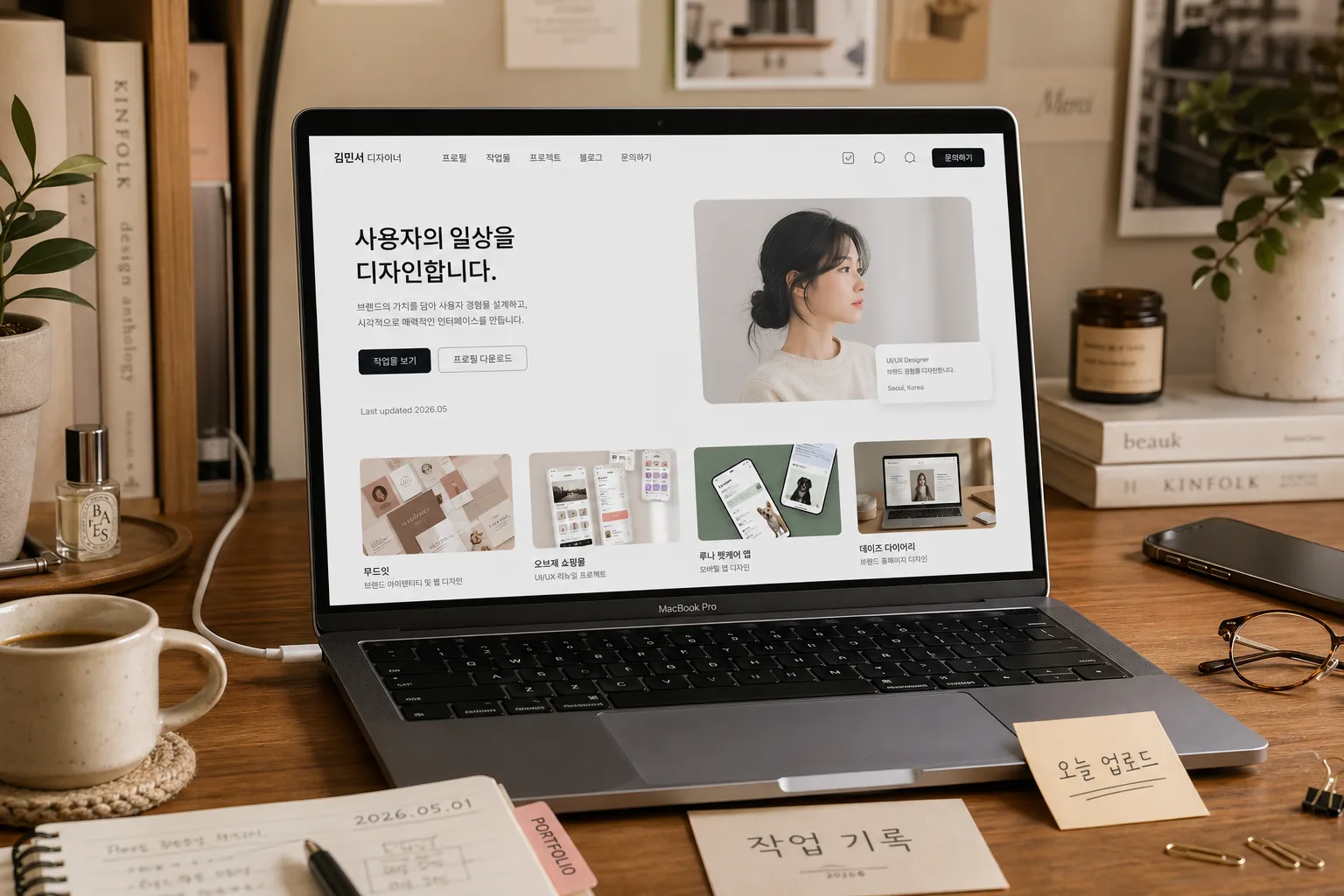
Photoreal device mockup for a personal brand, creator portfolio, online class page, or profile banner, showing a laptop or tablet with a custom screen insert that feels photographed in a real workspace.
Use for social profile headers, landing-page hero images, portfolio presentations, creator media kits, and personal branding visuals.

[Composition]
- Main device occupies 55–65% of the frame, angled slightly toward camera for clear screen visibility while keeping realistic perspective.
- Build a lived-in editorial desk scene around the device: oak or walnut desk surface, ceramic coffee cup, notebook with handwritten marks, slim pen, small plant, charging cable, phone, glasses, paper clips, and a few layered paper cards that support the personal-brand workspace mood.
- Background treatment: warm indoor workspace with tactile surfaces, soft shelves or wall art in shallow depth, realistic household details, and natural depth separation behind the screen.
- Keep the screen area as the visual focal point; place {디바이스} so the display is fully readable and not clipped.
- The screen content must be inserted with crisp perspective matching the device tilt, using {화면 컨텐츠}; if it contains a portrait, personal photo, portfolio page, or social profile design, make it look like it is actually displayed on glass.
- Add small real-world desk details that enhance scale and realism: a sticky note reading “오늘 업로드”, a notebook date label “2026.05.01”, a tiny tab sticker “PORTFOLIO”, and a small caption card near the device reading “작업 기록”.

[3. CORE STRUCTURE]
- Foreground hero area: {디바이스} on a desk, shown as a realistic product mockup with matte metal finish, accurate bezels, thin glass layer, hinge or tablet edge detail, keyboard/trackpad or stand structure when applicable.
- Screen insert layer: {화면 컨텐츠} centered within the device display, with correct edge alignment, slight perspective warp, native screen brightness, soft glass reflection, and readable UI or photo details.
- Screen context details: include believable browser/app chrome if appropriate, such as a slim top bar, small icons, thumbnail strip, profile badge, Korean UI labels like “프로필”, “작업물”, “문의하기”, and tiny metadata text such as “Last updated 2026.05”.
- Environment layer: {환경} arranged to frame the device naturally, with plant leaves, stationery, cable curves, fabric coaster, paper texture, and desk objects placed lower and to the sides so the screen remains visible.
- Lighting layer: {라이팅} rendered as believable indoor daylight, producing gentle contact shadow under the device, subtle edge highlights, screen-glass reflection, and soft dimensional shadows from nearby props.
- Color layer: apply {컬러 톤} across props, desk, background, stationery, and screen-adjacent details so the mockup feels cohesive and editorial, like a real photoshoot rather than a flat template.
- Format layer: {비율·구도} preserved for a 1536x1024 horizontal composition suitable for hero banners and social headers, with the device, props, and background distributed in a polished lifestyle layout.

[4. STYLE RULES]
- Typography: visible Korean text may appear on small desk notes, UI labels, portfolio tabs, and stickers; keep it modern, readable, and naturally integrated, using contemporary sans-serif styling on screen and casual handwritten styling on paper notes.
- Color palette: use warm beige, natural oak brown, soft cream, charcoal gray, muted sage accents, and any palette direction from {컬러 톤}; allow small accent colors from stationery, thumbnails, or the screen design.
- Border/shadow: soft realistic contact shadows and ambient occlusion; device shadow should feel physically grounded on the desk, with gentle edge falloff and plausible glass highlights.
- Surface finish: matte desk texture with visible paper grain or wood pores; device body should read as anodized aluminum with subtle bevels, fingerprints, and micro-scratches where light catches.
- Prop realism: coffee surface, ceramic glaze, notebook paper fibers, cable rubber, plant leaf veins, keyboard legends, trackpad edge, and tablet/laptop ports should have authentic material detail.

[5. VISUAL STYLE]
- Camera / lens: full-frame 50mm lens at f/2.8 for a natural product-lifestyle perspective, or 35mm lens if a slightly wider desk scene is needed.
- Lighting: soft window light from upper-left at about 45°, with mild fill from right and a faint shadow falloff across the desk; realistic reflections on the device glass and metal edges.
- Color grade: warm cream + oak brown + charcoal device, with slightly lowered saturation, natural skin/photo tones if present in {화면 컨텐츠}, and clean editorial contrast.
- Rendering quality: photoreal commercial still life, accurate perspective, tactile materials, realistic exposure balance between screen brightness and ambient room light.

[6. MOOD]
Premium lifestyle tech mockup — editorial studio still with a Kinfolk x Aesop workspace aesthetic, personal creator desk atmosphere, calm productivity, and refined portfolio-brand presentation.

[7. CRITICAL]
- Korean text accuracy: preserve all Korean text inside {화면 컨텐츠} exactly; additional small Korean labels must be legible, for example “오늘 업로드”, “작업 기록”, “프로필”, “작업물”, “문의하기”, “PORTFOLIO”.
- Screen content must remain legible, proportionally scaled, and aligned to the device perspective with believable screen luminance and glass reflection.
- If {화면 컨텐츠} includes a personal photo or portrait, keep facial features natural, realistic, and undistorted; avoid waxy skin or mismatched reflections.
- Hands are optional; if any human element appears in the scene, screen content, or reflection, keep it anatomically correct and realistically lit.
- Device details must match {디바이스}; if it is a laptop, show believable keyboard/trackpad/hinge; if it is an iPad or tablet, show believable bezel, stand, pencil or case detail when appropriate.

[8. 🚫 PROHIBITED]
- Fake official seals / certifications
- Broken Korean characters
- Celebrity composites / unauthorized likeness