광고/포스터
대학·고등학교 캠퍼스 투어 안내
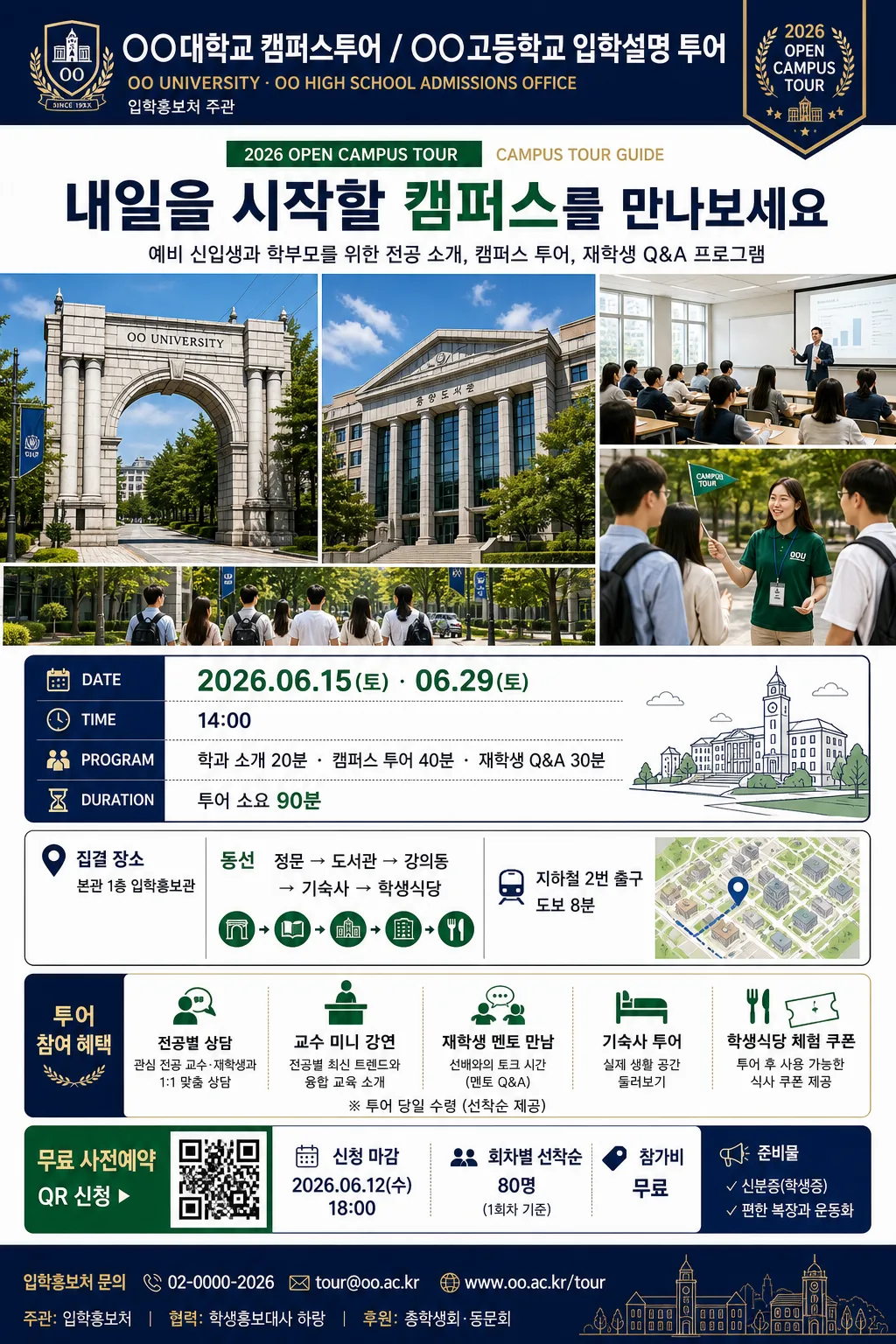
대학·고등학교 캠퍼스 투어·입학설명회 안내 카드.
대학·고등학교 캠퍼스 투어 안내 검색 요약
대학·고등학교 캠퍼스 투어 안내은 광고/포스터 결과물을 만들 때 바로 복사해 활용할 수 있는 ChatGPT 이미지 프롬프트입니다. 주제, 배경, 스타일, 구도 조건을 함께 담아 빠르게 시안을 만들 수 있도록 구성했습니다.
관련 키워드: 대학·고등학교 캠퍼스 투어 안내, 대학·고등학교 캠퍼스 투어 안내 프롬프트, 광고/포스터 프롬프트, 광고/포스터 AI 이미지 프롬프트, ChatGPT 이미지 프롬프트, AI 이미지 생성 프롬프트, AI 프롬프트, 이미지 프롬프트
대학·고등학교 캠퍼스 투어 안내 활용 포인트
원본 구조를 유지하면서 피사체, 배경, 색감, 구도를 바꿔 다양한 시안으로 확장할 수 있습니다.
- 핵심 소재는 유지하고 브랜드, 계절, 채널 목적에 맞는 색감과 배경을 바꿔보세요.
- 결과가 산만하면 배경 요소를 줄이고 피사체, 구도, 조명 조건을 구체화하세요.
- 복사한 뒤 ChatGPT에서 플랫폼, 화면 비율, 텍스트 포함 여부를 추가로 요청할 수 있습니다.
프롬프트 원문
[Input]
- language: Korean
- output_size: {비율}

[Purpose]
Korean and English campus tour 안내 poster for university and high school admissions marketing, tall A4-style layout.
Designed as a trustworthy recruitment flyer with a hero campus collage, practical visitor information, reservation guidance, and an admissions-event atmosphere.

[Composition]
- {비율} 기준의 Vertical A4 poster layout with a strong top-to-bottom reading flow; the school identity and event badge occupy the top 16%, the headline + hero campus image block takes the middle 44%, and the schedule, benefits, venue, reservation, sponsor, and contact information fill the lower 40%.
- Place {학교명_로고} with {영문학교명} in the masthead zone, paired with a small event label such as “2026 OPEN CAMPUS TOUR” and a campus admissions badge.
- Set {헤드라인} directly under the masthead in a prominent headline band, followed by {서브카피} as a concise invitation line.
- Use {hero_이미지} as the central visual anchor, framed as a polished campus collage or split scenic highlight: main gate, library facade, seminar classroom, students walking, and a small tour-guide moment.
- Place {투어_일정} in a clear schedule card near the mid-lower area, with date, time, program order, and duration separated into readable rows.
- Add {장소_동선} as a venue and route strip with simple directional icons, a small campus-map thumbnail impression, and arrival guidance.
- Present {포함_내용} as an admissions benefit checklist with small icons, short labels, and a few realistic details such as mentor talk, dormitory look-around, and cafeteria tasting.
- Add {신청_정보} as a ticket/reservation block with QR-code placeholder, registration deadline, capacity note, and participation fee.
- Place {문의_정보} and {후원_협력} in the footer area with phone, email, website, admissions office name, and a small sponsor/cooperation row.
- Use {컬러_팔레트} across header accents, dividers, schedule tags, map pins, QR frame, and decorative campus-line graphics.

[3. CORE STRUCTURE]
1. Top identity band: render {학교명_로고} as the primary institutional mark with {영문학교명} beneath or beside it; include a small “입학홍보처 주관” style credit line without making it look like a fake official seal.
2. Event label and headline: show “2026 CAMPUS TOUR GUIDE” or “OPEN CAMPUS DAY” as a compact bilingual event label, then set {헤드라인} in a bold Korean display style spanning most of the width.
3. Subcopy band: place {서브카피} under the headline in medium-weight Korean type, using one short sentence that explains who the tour is for.
4. Hero image block: compose {hero_이미지} as a cohesive admissions-brochure photo set; combine campus architecture, lecture atmosphere, student guide interaction, and outdoor walkway energy into one integrated visual block.
5. Schedule panel: place {투어_일정} inside a bordered information card with labels such as “DATE”, “TIME”, “PROGRAM”, and “DURATION”; use clear bullet separators and highlight the main date in the school accent color.
6. Venue and route strip: present {장소_동선} with a pin icon, small route arrows, meeting point, parking or public transit note, and a tiny campus-map graphic impression.
7. Benefits panel: present {포함_내용} as a structured checklist or stacked benefit cards aligned to the same grid as the schedule box.
8. Reservation and ticket block: show {신청_정보} with a QR-code placeholder, “무료 / 사전예약”, application deadline, seat limit, and a short CTA button such as “지금 신청하기”.
9. Footer information: include {문의_정보}, {후원_협력}, website line, page-code or document number, and a slim decorative rule so the poster feels like a real admissions office announcement.
10. Decorative system: apply {장식_그래픽} as campus-line illustrations, subtle route dots, notebook-tab labels, small calendar icons, and admissions-themed chips.

[4. STYLE RULES]
- Typography: use Pretendard Bold or Noto Sans KR Bold for the headline, Pretendard Medium for body copy, and a slightly condensed sans style for schedule labels; headline size should dominate, while schedule, venue, and reservation text remains readable at poster distance.
- Color palette: use {컬러_팔레트} as the key accent system, paired with white #FFFFFF, charcoal #2B2B2B, warm gray #E8E8E8, and one soft campus-tint background panel.
- Border/shadow: use thin 1px neutral rules, subtle card borders, rounded 10–18px information panels, and a soft drop shadow with 0–4px y-offset, 10–14px blur, 10–15% opacity for the hero and info panels.
- Information graphics: use small calendar, clock, map-pin, bus, QR, checklist, and speech-bubble icons in a consistent line style.
- Poster realism: include believable admissions-office details such as application period, capacity, venue name, inquiry number, QR reservation area, sponsor/cooperation row, and small print notes.

[5. VISUAL STYLE]
- Camera / lens: create the campus imagery with a 24mm wide-angle architectural feel for buildings and a 50mm natural-perspective look for student scenes, composed like a polished admissions brochure photo set.
- Lighting: bright overcast daylight or soft morning window light from upper-left, with gentle fill from front-right to keep faces and buildings evenly exposed and formal.
- Color grade: clean institutional tones with white, deep navy, muted green, and warm gray; keep saturation controlled and contrast moderate for a trustworthy school-promo look.
- Image texture: realistic printed-poster finish with crisp vector typography, high-resolution campus photography, refined paper grain, and precise panel edges.

[6. MOOD]
Editorial admissions brochure — polished university open-campus flyer aesthetic, like a premium education magazine event poster with a welcoming school-tour atmosphere, real visitor guidance, and confident institutional design.

[7. CRITICAL]
- Korean text accuracy: 반드시 아래 문구가 정확히 보여야 함: {학교명_로고}, {영문학교명}, {헤드라인}, {서브카피}, {hero_이미지}, {투어_일정}, {장소_동선}, {포함_내용}, {신청_정보}, {문의_정보}, {후원_협력}, {컬러_팔레트}, {장식_그래픽}, {비율}
- Poster must visibly include: “2026 OPEN CAMPUS TOUR”, “무료 사전예약”, “QR 신청”, “입학홍보처 문의”, “집결 장소”, “투어 소요 90분”.
- Layout invariants: vertical A4 poster in {비율}, clear hierarchy from school identity to headline to hero campus image to schedule to reservation/contact, with realistic admissions-event density and stable perspective on all text.
- All Korean text must render crisply with correct spacing, punctuation, and line breaks.

[8. 🚫 PROHIBITED]
- Fake official seals / certifications
- Broken Korean characters
- AI-generated gibberish text
- Celebrity composites or unrelated public figures