写真加工・フィルター
한국 픽시브 일러스트 사진 변환
사용자 사진을 한국 픽시브·시티팝 톤 일러스트로 변환. 인물·배경 사진 모두 가능.
한국 픽시브 일러스트 사진 변환の概要
写真加工・フィルター画像を作るためのChatGPT画像プロンプトです。主題、背景、スタイル、構図を整理し、すぐに試せるよう構成しています。
関連キーワード: 한국 픽시브 일러스트 사진 변환, 한국 픽시브 일러스트 사진 변환 프롬프트, 写真加工・フィルター 프롬프트, 写真加工・フィルター AI 이미지 프롬프트, ChatGPT 이미지 프롬프트, AI 이미지 생성 프롬프트, AI 프롬프트, 이미지 프롬프트
한국 픽시브 일러스트 사진 변환の活用方法
元の構造を保ちながら、被写体、背景、色、構図を変更して別案に展開できます。
- 主題を維持し、ブランドや季節、媒体に合わせて色と背景を変更してください。
- 結果が複雑な場合は背景要素を減らし、被写体、構図、照明を具体化してください。
- コピー後、ChatGPTに媒体、アスペクト比、文字の有無を追加で指定できます。
プロンプト原文
[Input]
- reference_image: {참고 이미지}
- language: Korean
- output_size: 1024x1024

[Purpose]
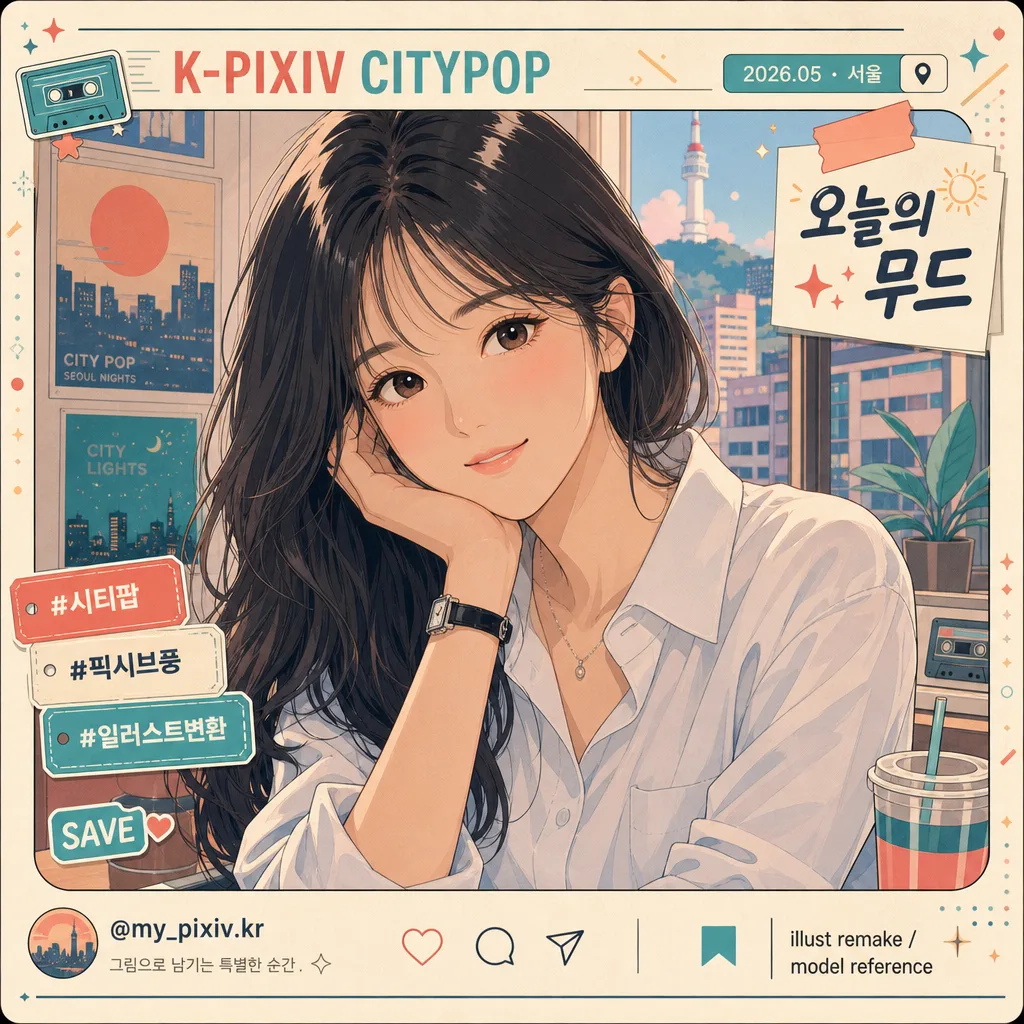
Convert the attached photo into a Korean Pixiv-style citypop illustration portrait, keeping the subject recognizable while replacing raw photographic realism with polished anime rendering and a lively social portrait-card presentation.
Designed for i2i use as a shareable character-art transformation: the person remains the clear focus, while the surrounding layout gains realistic Korean social-post details, subtle stickers, date/location labels, and citypop graphic accents.

[Composition]
- Preserve the original subject’s identity, pose, composition, and clothing silhouette using {보존 항목} as the non-negotiable layout anchor.
- Keep the main subject dominant in frame, with the body and face proportions matching the source image and the original crop respected.
- Apply {변환 방향} as the overall art direction, while preserving the silhouette and spatial relationships from the source.
- Use {참고 이미지} as the visual base; retain key facial landmarks, hairstyle outline, hand position, and outfit outline, but re-render everything in illustration form.
- Enrich the square frame as a Korean Pixiv / citypop portrait card: add a tasteful top label reading “K-PIXIV CITYPOP”, a small date/location tag such as “2026.05 · 서울”, a short caption sticker “오늘의 무드”, and 2–3 small decorative tags like “#시티팝”, “#일러스트변환”, “SAVE”.
- Add small social-card details near the edge: a tiny handle such as “@my_pixiv.kr”, micro save/share icons, a small credit line “illust remake / model reference”, and soft geometric citypop accents that frame the subject without covering the face.

[Core Structure]
- Base layer: rebuild the entire image as a clean 2D illustration, replacing raw photographic depth cues with confident anime cel shapes while retaining recognizable lighting and spatial placement from the reference.
- Subject rendering: draw the face, hair, skin, and clothing with smooth contour lines, simplified planes, expressive eyes, and carefully shaped highlights, while keeping the original likeness and pose intact.
- Color blocking: apply {변환 효과} across the full image, using large flat tone regions supported by small accent gradients in the background graphics.
- Texture pass: add {질감} to lines and shading so the result feels like a polished Pixiv-subculture illustration printed on a matte social card, with faint paper grain and soft scan-like warmth.
- Background and layout pass: translate the original background into a stylized citypop environment or graphic backdrop, adding believable details such as window-light shapes, neon sign fragments, cassette/star/sun motifs, subtle Korean label stickers, and layered translucent color panels.
- Final correction: ensure {금지} is fully avoided while maintaining the subject’s recognizable identity, natural expression, and original outfit silhouette.

[Style Rules]
- Typography: include small, readable Korean design text as part of the portrait-card layout. Use a Noto Sans KR-like sans serif style for labels and a slightly rounded bold Korean display style for one short caption sticker. Keep text crisp and correctly formed.
- Render visible Korean text examples: “오늘의 무드”, “서울 · 2026.05”, “#시티팝”, “#픽시브풍”, “@my_pixiv.kr”. If source text exists, preserve it where appropriate and integrate it into the illustration.
- Color palette: cream #F4E7D3, coral #F07F76, teal #67B7B0, soft peach #F6B89A, muted navy #2E3A57; keep saturation moderate and use matte finishes.
- Border/shadow: use illustration-friendly separation with soft contour shadow at 12% opacity, layered sticker shadows, small tape-label shapes, thin frame lines, and citypop graphic panels that make the card feel designed and complete.
- Details: add small but plausible social-post UI marks, decorative sparkles, tiny arrows, rounded caption chips, and subtle paper-print texture while keeping the face and upper body visually dominant.

[Visual Style]
- Camera / lens: reinterpret as a 50mm portrait photo translated into a flat illustration, with no visible lens distortion and no depth-of-field blur.
- Lighting: emulate gentle overcast daylight translated into even cel-shading, with a soft highlight from upper-left and a restrained shadow falloff.
- Color grade: matte citypop palette with cream, coral, and teal tones, slightly faded like a vintage Japanese pop illustration scan.
- Finish: crisp digital line art, layered cel shadows, smooth hair highlights, gentle blush tones, graphic poster-card layout, and faint matte paper grain that adds tactility.

[Mood]
Korean Pixiv x citypop illustration — a polished subculture portrait with clean anime rendering, vintage pop color treatment, and a lively square social-card design that feels ready to post.

[Critical]
- Korean text accuracy: must preserve the following verbatim Korean strings if any text is present in the source and should remain readable: "한국 픽시브·시티팝 풍 일러스트", "인물 정체성·포즈·구도·복장 윤곽", "flat anime cel-shading, 매트한 페이드 톤(크림·코랄·청록), 픽시브 서브컬처 일러스트 화풍", "clean line art + 부드러운 flat color, no pointillism, no halftone", "사진 같은 photo-realism, over-stylized 만화화, 인물 외형 변경".
- Add readable Korean portrait-card text where it fits the composition: “오늘의 무드”, “서울 · 2026.05”, “#시티팝”, “#일러스트변환”, “@my_pixiv.kr”. Keep every Korean character clean, complete, and legible.
- Keep facial identity, pose, framing, and outfit outline consistent with {보존 항목}; do not change the subject’s body type, age impression, or gender presentation.
- Render as a fully illustrated image with clean line art, flat color planes, expressive anime-style facial detail, and matte citypop graphic design.

[8. 🚫 PROHIBITED]
- Fake official seals / certifications
- Broken Korean characters
- Unauthorized celebrity composites or public-figure likeness if not present in the reference