照片轉換/濾鏡
한국 픽시브 일러스트 사진 변환
사용자 사진을 한국 픽시브·시티팝 톤 일러스트로 변환. 인물·배경 사진 모두 가능.
한국 픽시브 일러스트 사진 변환摘要
這是用來製作照片轉換/濾鏡內容的 ChatGPT 圖像提示詞,已整理主題、背景、風格與構圖,方便快速調整。
相關關鍵字: 한국 픽시브 일러스트 사진 변환, 한국 픽시브 일러스트 사진 변환 프롬프트, 照片轉換/濾鏡 프롬프트, 照片轉換/濾鏡 AI 이미지 프롬프트, ChatGPT 이미지 프롬프트, AI 이미지 생성 프롬프트, AI 프롬프트, 이미지 프롬프트
한국 픽시브 일러스트 사진 변환使用方式
保留原始結構並替換主體、背景、色彩或構圖,即可延伸出不同版本。
- 保留核心主體,並依品牌、季節或平台調整色彩與背景。
- 如果畫面太複雜,請減少背景元素並具體描述主體、構圖與光線。
- 複製後可要求 ChatGPT 配合平台、長寬比或文字需求調整。
提示詞原文
[Input]
- reference_image: {참고 이미지}
- language: Korean
- output_size: 1024x1024

[Purpose]
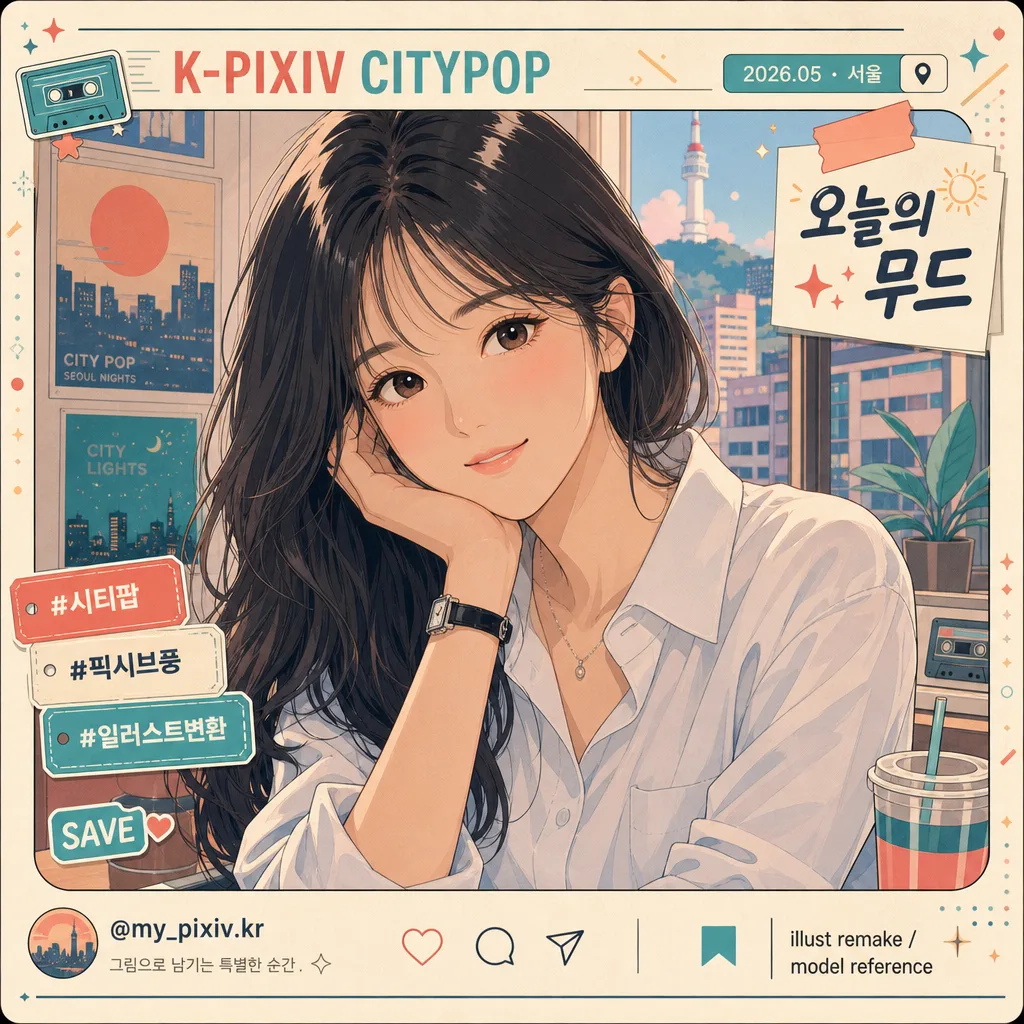
Convert the attached photo into a Korean Pixiv-style citypop illustration portrait, keeping the subject recognizable while replacing raw photographic realism with polished anime rendering and a lively social portrait-card presentation.
Designed for i2i use as a shareable character-art transformation: the person remains the clear focus, while the surrounding layout gains realistic Korean social-post details, subtle stickers, date/location labels, and citypop graphic accents.

[Composition]
- Preserve the original subject’s identity, pose, composition, and clothing silhouette using {보존 항목} as the non-negotiable layout anchor.
- Keep the main subject dominant in frame, with the body and face proportions matching the source image and the original crop respected.
- Apply {변환 방향} as the overall art direction, while preserving the silhouette and spatial relationships from the source.
- Use {참고 이미지} as the visual base; retain key facial landmarks, hairstyle outline, hand position, and outfit outline, but re-render everything in illustration form.
- Enrich the square frame as a Korean Pixiv / citypop portrait card: add a tasteful top label reading “K-PIXIV CITYPOP”, a small date/location tag such as “2026.05 · 서울”, a short caption sticker “오늘의 무드”, and 2–3 small decorative tags like “#시티팝”, “#일러스트변환”, “SAVE”.
- Add small social-card details near the edge: a tiny handle such as “@my_pixiv.kr”, micro save/share icons, a small credit line “illust remake / model reference”, and soft geometric citypop accents that frame the subject without covering the face.

[Core Structure]
- Base layer: rebuild the entire image as a clean 2D illustration, replacing raw photographic depth cues with confident anime cel shapes while retaining recognizable lighting and spatial placement from the reference.
- Subject rendering: draw the face, hair, skin, and clothing with smooth contour lines, simplified planes, expressive eyes, and carefully shaped highlights, while keeping the original likeness and pose intact.
- Color blocking: apply {변환 효과} across the full image, using large flat tone regions supported by small accent gradients in the background graphics.
- Texture pass: add {질감} to lines and shading so the result feels like a polished Pixiv-subculture illustration printed on a matte social card, with faint paper grain and soft scan-like warmth.
- Background and layout pass: translate the original background into a stylized citypop environment or graphic backdrop, adding believable details such as window-light shapes, neon sign fragments, cassette/star/sun motifs, subtle Korean label stickers, and layered translucent color panels.
- Final correction: ensure {금지} is fully avoided while maintaining the subject’s recognizable identity, natural expression, and original outfit silhouette.

[Style Rules]
- Typography: include small, readable Korean design text as part of the portrait-card layout. Use a Noto Sans KR-like sans serif style for labels and a slightly rounded bold Korean display style for one short caption sticker. Keep text crisp and correctly formed.
- Render visible Korean text examples: “오늘의 무드”, “서울 · 2026.05”, “#시티팝”, “#픽시브풍”, “@my_pixiv.kr”. If source text exists, preserve it where appropriate and integrate it into the illustration.
- Color palette: cream #F4E7D3, coral #F07F76, teal #67B7B0, soft peach #F6B89A, muted navy #2E3A57; keep saturation moderate and use matte finishes.
- Border/shadow: use illustration-friendly separation with soft contour shadow at 12% opacity, layered sticker shadows, small tape-label shapes, thin frame lines, and citypop graphic panels that make the card feel designed and complete.
- Details: add small but plausible social-post UI marks, decorative sparkles, tiny arrows, rounded caption chips, and subtle paper-print texture while keeping the face and upper body visually dominant.

[Visual Style]
- Camera / lens: reinterpret as a 50mm portrait photo translated into a flat illustration, with no visible lens distortion and no depth-of-field blur.
- Lighting: emulate gentle overcast daylight translated into even cel-shading, with a soft highlight from upper-left and a restrained shadow falloff.
- Color grade: matte citypop palette with cream, coral, and teal tones, slightly faded like a vintage Japanese pop illustration scan.
- Finish: crisp digital line art, layered cel shadows, smooth hair highlights, gentle blush tones, graphic poster-card layout, and faint matte paper grain that adds tactility.

[Mood]
Korean Pixiv x citypop illustration — a polished subculture portrait with clean anime rendering, vintage pop color treatment, and a lively square social-card design that feels ready to post.

[Critical]
- Korean text accuracy: must preserve the following verbatim Korean strings if any text is present in the source and should remain readable: "한국 픽시브·시티팝 풍 일러스트", "인물 정체성·포즈·구도·복장 윤곽", "flat anime cel-shading, 매트한 페이드 톤(크림·코랄·청록), 픽시브 서브컬처 일러스트 화풍", "clean line art + 부드러운 flat color, no pointillism, no halftone", "사진 같은 photo-realism, over-stylized 만화화, 인물 외형 변경".
- Add readable Korean portrait-card text where it fits the composition: “오늘의 무드”, “서울 · 2026.05”, “#시티팝”, “#일러스트변환”, “@my_pixiv.kr”. Keep every Korean character clean, complete, and legible.
- Keep facial identity, pose, framing, and outfit outline consistent with {보존 항목}; do not change the subject’s body type, age impression, or gender presentation.
- Render as a fully illustrated image with clean line art, flat color planes, expressive anime-style facial detail, and matte citypop graphic design.

[8. 🚫 PROHIBITED]
- Fake official seals / certifications
- Broken Korean characters
- Unauthorized celebrity composites or public-figure likeness if not present in the reference