Profiles/Avatars
픽셀아트 8-bit 사진 변환
본인 사진 → 픽셀아트·8-bit 도트 결로 변환.
픽셀아트 8-bit 사진 변환 summary
Copy this ChatGPT image prompt to create Profiles/Avatars results. Its subject, background, style, and composition are organized for quick iteration.
Related keywords: 픽셀아트 8-bit 사진 변환, 픽셀아트 8-bit 사진 변환 프롬프트, Profiles/Avatars 프롬프트, Profiles/Avatars AI 이미지 프롬프트, ChatGPT 이미지 프롬프트, AI 이미지 생성 프롬프트, AI 프롬프트, 이미지 프롬프트
How to use 픽셀아트 8-bit 사진 변환
Keep the prompt structure and swap the subject, background, palette, or composition to create new variations.
- Keep the main subject and adjust the palette and background for your brand, season, or channel.
- If the result feels busy, simplify the background and make the subject, composition, and lighting more specific.
- After copying, ask ChatGPT to adapt it for your platform, aspect ratio, or text requirements.
Original prompt
[Input]
- reference_image: {참고 이미지}
- language: Korean
- output_size: 1024x1024

[Purpose]
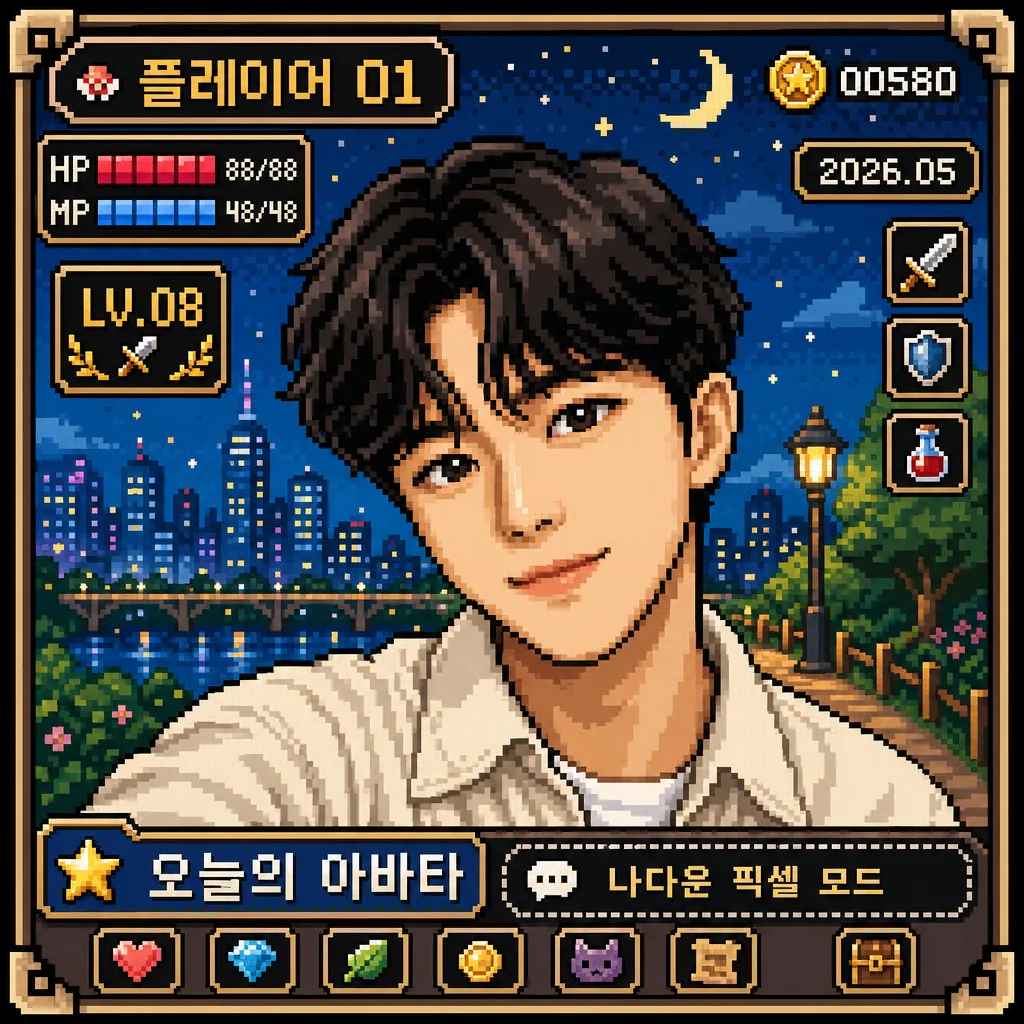
8-bit pixel art conversion of a portrait photo, preserving the original face and pose while translating the image into a retro game-style square character portrait. Designed for avatar use, profile images, nostalgic social sharing, and a finished collectible RPG-style profile card rather than a plain cutout.

[Composition]
- Center the original person as the main subject, keeping the same framing, head angle, and facial expression from {원본 인물}; maintain a square 1:1 portrait crop where the face, hair shape, shoulders, and recognizable silhouette remain clear.
- Build the artwork as a polished retro character profile card: the portrait sits inside a hard-edged pixel frame, with {배경} behind the subject as a pixel scene, tile pattern, arcade backdrop, city-night grid, fantasy field, or console-menu environment that matches the source mood.
- Add small 8-bit interface details around the portrait without covering the face: pixel corner brackets, tiny HP/MP-style bars, a level badge, a coin/star icon, and a small date label.
- Include short Korean pixel UI text as part of the avatar card, such as “플레이어 01”, “오늘의 아바타”, “LV.08”, “2026.05”, and a tiny caption line “나다운 픽셀 모드”. Keep all text short, blocky, and readable.
- Apply {비율} strictly, keeping the subject’s proportions faithful while allowing retro-game framing elements, small badges, and background props that naturally belong in an 8-bit character portrait.

[3. CORE STRUCTURE]
- Subject rendering: Convert {원본 인물} into crisp 8-bit pixel art, preserving identity, pose, and expression from the source image; simplify facial features into readable pixel clusters with distinct eyes, brows, nose bridge, mouth shape, cheek shadows, hair blocks, and clothing folds.
- Pixel treatment: Use {픽셀 결} with visible square edges, limited dithering, clean stair-stepped contours, and game-console-era block shapes; all outlines and highlights should align to an intentional pixel grid.
- Color application: Map the source image into {컬러 팔레트}, keeping skin, hair, clothing, accessories, highlights, and shadows separated by a small set of solid tones for a classic retro-game look.
- Background rendering: Build {배경} as a lively pixel environment with layered tiles, small stars, floor blocks, skyline pixels, arcade UI panels, patterned wallpaper, or scenery elements that support the subject and make the image feel like a complete 1990s game portrait screen.
- UI and card details: Add a pixel border, status-strip area, small icon row, “LV.08” badge, tiny nameplate reading “플레이어 01”, and one compact Korean caption such as “오늘의 아바타”; place them along the edges or lower panel so they enhance the portrait without obscuring identity.
- Pose and expression lock: Preserve {자세·표정} exactly so the converted artwork still feels like the same person, only reinterpreted through 8-bit styling.
- Final output: Present the image as a finished square pixel-art avatar card with consistent grid alignment, rich retro context, sharp pixel edges, and cohesive game-screen composition.

[4. STYLE RULES]
- Typography: use short Korean pixel-font labels only, rendered as blocky 8-bit text. Suggested text elements: “플레이어 01”, “오늘의 아바타”, “LV.08”, “2026.05”, “나다운 픽셀 모드”. Text must be legible and intentionally placed like a retro RPG status panel.
- Color palette: strictly limited 8–16 colors from {컬러 팔레트}, favoring classic retro tones such as muted cyan, saturated magenta, warm beige, deep navy, moss green, pixel white, and shadow brown if they fit the source.
- Border/shadow: use hard-edged pixel shadows, 1–2 pixel offset dark outlines, tile-like dividers, and chunky UI panels; avoid soft blur, glossy shading, and modern gradient glow.
- Detail density: enrich the frame with authentic 8-bit game details—tiny icons, status bars, patterned tiles, scene props, and caption strips—while keeping the face as the strongest focal point.

[5. VISUAL STYLE]
- Camera / lens: source-photo-to-pixel conversion look, emulating a Game Boy / NES / SNES-era sprite portrait rather than a modern camera render.
- Lighting: preserve the original light direction from the source image, but translate it into flat 8-bit tonal blocks with simplified highlight and shadow regions.
- Color grade: retro console palette, slightly nostalgic and compressed, with visible palette stepping, deliberate dithering, and no full-spectrum photographic richness.
- Finish: authentic pixel-screen presentation, like a captured RPG character menu or handheld-console avatar screen, with crisp grid structure and tactile old-game charm.

[6. MOOD]
Retro handheld-console portrait — like a polished 1990s RPG character profile screen, Game Boy Color avatar card, or arcade character-select tile with playful Korean UI details.

[7. CRITICAL]
- Korean text accuracy: render short Korean labels clearly, especially “플레이어 01”, “오늘의 아바타”, “LV.08”, “2026.05”, and “나다운 픽셀 모드”.
- Preserve the original person’s identity, facial proportions, pose, and expression from {원본 인물}.
- Maintain exact square framing at {비율} with no crops that remove key facial features.
- Keep the pixel grid visibly intentional: sharp blocks, clean edges, readable UI text, and retro game readability.
- Ensure added pixel UI, icons, and background elements frame the portrait and do not cover the eyes, mouth, or defining facial features.

[8. 🚫 PROHIBITED]
- Fake official seals/certifications
- 한글 깨짐 또는 의도한 Korean UI text의 오탈자
- Celebrity composites or unauthorized likeness